When people need a plumber fast, they often choose a business from the first Google results. If your plumbing company is not showing up, you could be losing calls and local jobs.
Many plumbers struggle with incomplete profiles, wrong business details, or too few reviews. These problems can reduce trust and make it harder for customers to contact you.
This guide explains how to set up and optimize your Google Business Profile step by step. You’ll learn how to improve local visibility, get more plumbing leads, and support your website with better local SEO results.
What You Need Before You Start
Grab these before you open Google. Doing it now saves a lot of clicking back and forth later.
- A Gmail account (use your business email, not a personal one)
- Your exact business name as it appears on your van, invoices, and website
- The phone number you actually want customers to call
- Your website URL
- A list of cities, towns, or zip codes you serve
- Your hours, including any 24/7 emergency service
- 8 to 10 real photos: your van, your team, your tools, finished work, your logo
- A short description of what you do
Don’t have polished photos? Use what you’ve got. Real phone snaps of completed jobs beat stock images every single time.
Steps to Set Up Google Business Profile for Plumbing Websites
A properly set up Google Business Profile helps plumbing websites improve local visibility, build trust, and generate more customer calls.
Follow these main steps:
- Go to the Google Business Profile setup page
- Add your plumbing business name
- Choose the right business category
- Set your service area details
- Add your phone number and website
- Verify your business
- Complete your profile information
- Connect your website to your profile
- Upload business photos
- Get and respond to reviews
- Post regular updates
- Maintain your profile and avoid common mistakes
Below, we explain each step in detail to help you set up and optimize your plumbing Google Business Profile correctly.
Step 1: Go to the Right Page
Open your browser and head to business.google.com. Sign in with the Gmail account you want to use.
If your business is already on Google (sometimes Google auto-creates listings from old data), you’ll see a “Claim this business” button. Click that instead of starting fresh — having two listings for the same business causes ranking problems.
If nothing comes up, click “Add your business to Google” or “Manage now.”
Step 2: Business Name and Category
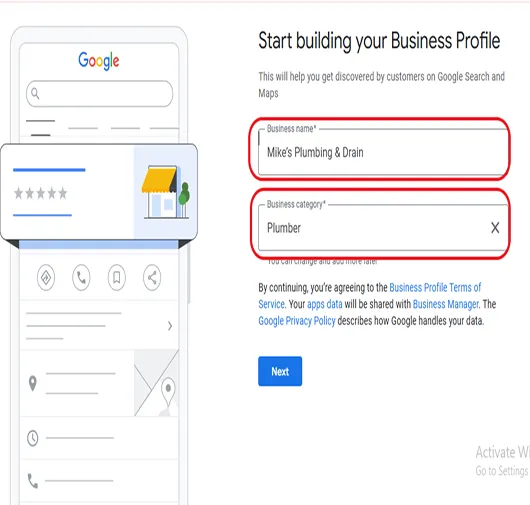
Enter your business name exactly as it is used in real life, like on your website or truck.
Avoid adding extra keywords. For example, use “Mike’s Plumbing & Drain”, not “Best Emergency Plumber in Dallas.” This can cause problems with Google.
Next, choose your main category. Select “Plumber” as your primary category.
This is very important because it tells Google what your business does and helps you show up in the right searches.
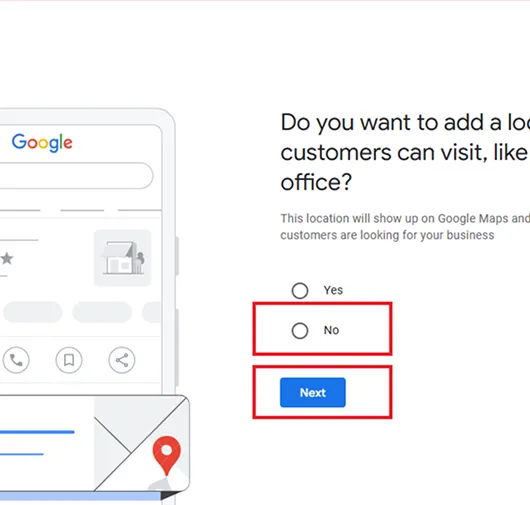
Step 3: Set Your Service Area
Google will ask if customers can visit your location. Most plumbers should choose “No” because you usually go to customers.
With SAB:
- Your address stays hidden
- You show up in multiple areas you serve
- You can add up to 20 service areas
Only add a physical address if you have a shop or office that customers can visit.
Next, add your real service areas, like cities or ZIP codes you actually cover. Keep it honest—don’t add far locations you don’t work in.
For example: Plano, Frisco, Allen, McKinney, 75024, 75025
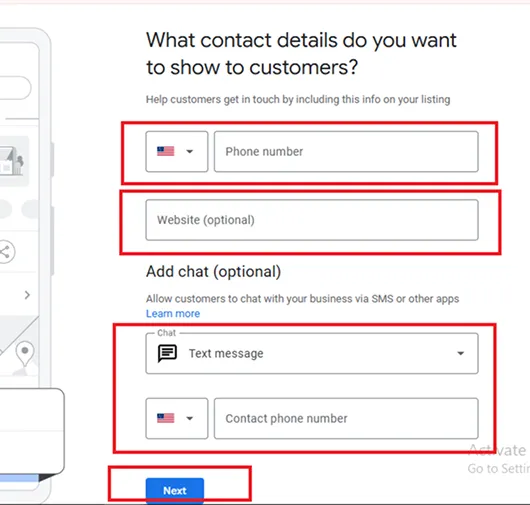
Step 5: Add Your Phone Number and Website
Use the same phone number that’s on your website. Same format too.
If your website shows (555) 123-4567, don’t put 555-123-4567 here. Google treats these as different numbers, which weakens your local ranking signals.
This consistency is called NAP — Name, Address, Phone — and matching it everywhere matters more than most plumbers realize.
The same goes for your website URL: pick one version (with www or without, http or https) and use it everywhere.
Step 6: Verify Your Business
Google needs to confirm you’re actually a plumber and not someone trying to hijack a business. You’ll get one or more of these verification options:
| Method | Speed | Notes |
|---|---|---|
| Postcard by mail | 5–14 days | Code arrives at your address |
| Phone or text | Instant | Code sent to your business number |
| Instant | Code sent to your verified email | |
| Video verification | 1–5 days | Record a short walkthrough |
Pick whichever Google offers. Video is becoming the most common option for plumbers. Have your van, business cards, work tools, and a recent invoice ready before you start recording.
Don’t cut the video, Google wants one continuous take. Until you finish verification, your profile won’t appear in search results. Do this part right away.
Step 7: Complete Every Single Field
Once verified, open your dashboard and fill out everything. An incomplete profile gets buried; a complete one gets calls.
Business Description (up to 750 characters)
Write 2–3 short paragraphs about what you do, who you help, and what makes you different. Mention your main services and your service area naturally — but don’t keyword-stuff.
Example opener:
“We’re a family-owned plumbing company serving homeowners across North Dallas. From burst pipes at 2 am to a slow shower drain on a Sunday, we show up fast, charge fair prices, and clean up before we leave.”
Hours
Set them accurately. If you offer 24/7 emergency service, mark “Open 24 hours” so the “Open now” badge shows up at midnight when somebody really needs you.
Services (this one is huge)
Add every service you offer as a separate item. People search for these exact terms.
- Drain Cleaning
- Water Heater Repair
- Water Heater Installation
- Tankless Water Heater Install
- Slab Leak Detection
- Sewer Line Repair
- Toilet Installation
- Garbage Disposal Repair
- Sump Pump Service
- Gas Line Repair
- Repiping
- Faucet Installation
- Backflow Testing
Add a short description and price (or “Call for quote”) to each one.
Secondary Categories
Add 2–4 more categories that match what you do. Good options for plumbers:
- Drainage service
- Hot water system supplier
- Gasfitter
- Septic system service
- Bathroom remodeler (if you do renovations)
Attributes
Check every box that applies — these show up as badges on your profile:
- Locally owned
- Veteran-owned
- Women-led
- Online estimates
- Appointment required
- LGBTQ+ friendly
- Wheelchair accessible (if you have a shop)
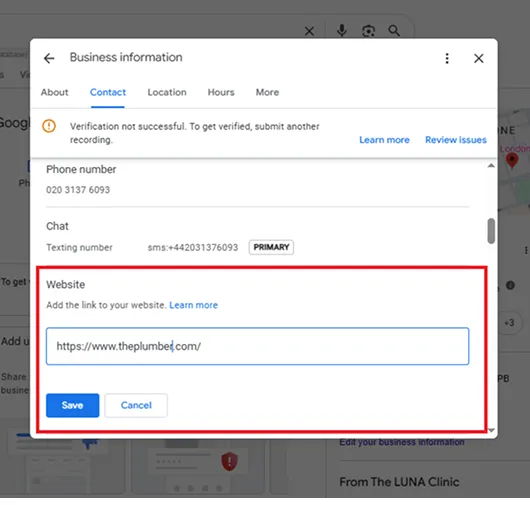
Step 8: Connect Your Website (The Part Most Plumbers Skip)
This is where the profile and your website start working together. Three things to do:
1. Link Services to Service Pages
Add the website URL to your GBP. Use the homepage as your default — but for each Service you added in Step 7, link it to the matching service page on your site.
So “Water Heater Repair” on GBP should link to:
yourdomain.com/services/water-heater-repair
…not just the homepage. This signals to Google that your website backs up what your profile says, and sends visitors to a page that can actually convert them.
2. Match NAP on Your Website
The footer of your website should show the same business name, phone number, and service areas as your profile. If you have a Contact page, repeat the info there.
WordPress users: Install a schema plugin (RankMath or Yoast Local SEO) and add your LocalBusiness schema with matching information. This helps Google confirm your business details and improves visibility for local seo services for plumber searches.
3. Embed Your Google Map
Once your profile is live:
- Search your business name on Google Maps
- Click Share → “Embed a map.”
- Copy the iframe
- Paste it into your website’s Contact page
This visually connects your site to your GBP in Google’s eyes.
Step 9: Upload Photos the Right Way
Profiles with 10+ photos get noticeably more calls than ones with two stock images. Upload these categories:
| Type | What to Show |
|---|---|
| Logo | Clean, square, white, or transparent background |
| Cover photo | Your branded van or team in uniform |
| Team photos | Faces build trust — strangers are coming into homes |
| Work photos | Before-and-after shots (corroded vs. new water heater) |
| Tools & trucks | Van at a job site, tools laid out |
| Behind the scenes | Diagnosing a problem, explaining work to a customer |
Upload 2–3 new photos every month after launch. Active profiles outrank dormant ones
Step 10: Get Reviews and Respond to All of Them
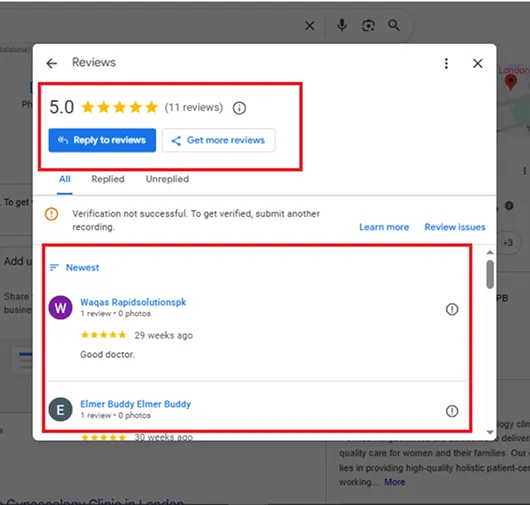
Reviews are very important for local rankings and help customers trust your business.
After every job, ask customers for a Google review. Send them your review link and keep the message
simple:
“Thanks for your support today. If you’re happy, please leave a quick review here: [link].”
Reply to every review within 1–2 days.
For good reviews, keep it short:
“Thanks, Sarah! Glad we could help with your plumbing issue.”
For bad reviews, stay calm and polite:
“Sorry for the experience. Please call us at [number] so we can fix this.”
Good review management builds trust and improves your ranking.
Step 11: Post Weekly Updates
GBP has a built-in posting feature most plumbers ignore. Use it. Post once a week with:
- Seasonal tips — “3 ways to keep your pipes from freezing this winter”
- Special offers — “$50 off any drain cleaning this month.”
- Recent jobs — “Replaced a 20-year-old water heater in Frisco yesterday.”
- Reminders — “Daylight savings is a great time to test your sump pump.”
Posts expire after 7 days, which is why you keep them coming. Each one is another opportunity to show up in search.
Common Mistakes That Hurt Plumbers’ Profiles
- Listing a fake or rented address to look local. Google catches this and suspends profiles permanently. Use service areas instead.
- Different phone numbers on the website, GBP, Yelp, and Facebook. Pick one and use it everywhere.
- Ignoring the Q&A section. Customers ask questions on your profile — if you don’t answer, they leave. Check weekly. You can also seed it yourself with common questions.
- Using stock photos. Google can detect them, and customers don’t trust them. Real photos always.
- Setting up the profile and never logging back in. A neglected profile slides down the rankings.
A Simple Weekly Routine
Once everything is set up, maintenance is small. Block 15 minutes every Friday afternoon for these five things:
- Reply to any new reviews
- Answer any new questions in the Q&A
- Upload one or two job photos
- Publish one Google Post
- Glance at the Insights tab to see what searches were found for you
That’s it. Consistency beats perfection. Plumbers who do these five things every week outrank competitors with bigger ad budgets but dead profiles.
The Bottom Line
A Google Business Profile won’t replace your website, and your website won’t replace your GBP. They work together:
- Your profile is what gets you found at 11 pm when someone has water on the floor
- Your website is what closes the deal once they click through
Set both up properly, link them, keep them consistent, and stay active.
Do this right and within 60 to 90 days you’ll see your phone start ringing more — with better-quality calls from people in your actual service area, ready to book.